Designing and Documenting a Secure Security Event Ingestion API
Security teams need a reliable way to collect events from applications, services, and infrastructure — and later query those events for investigations, alerting, and audit trails.
A security event ingestion API accepts structured event payloads over HTTP, validates them, stores them durably, and makes them easy to troubleshoot when things go wrong.
This guide walks through building a production-minded ingestion API with:
- Strict schema validation
- Authentication using API keys
- Rate limiting
- Idempotency support
- Durable event storage (SQLite for local development)
- CLI-based testing (
curl) - OpenAPI-ready documentation (Swagger UI)
In this article, we design and implement:
- A secure event ingestion API using FastAPI. We define a strict event schema, enforce authentication with API keys, apply rate limiting to protect the endpoint, and persist events to a local database.
- We then document the API using OpenAPI (Swagger UI) and demonstrate how to test it via both CLI and interactive documentation.
Prerequisites
Skills
- Basic REST API concepts (methods, status codes, JSON)
- Comfortable using the command line
Tools
- Python 3.11+
- Git
- curl
What You Will Build
By the end of this guide, you will have implemented the following endpoints:
| Endpoint | Purpose |
|---|---|
POST /v1/events | Ingest a single security event |
GET /healthz | Health check |
Project Structure
siem-event-api/
└── app/
    ├── main.py
    ├── schemas.py
    ├── db.py
    ├── auth.py
    └── rate_limit.py
Note — Development environment
This API was implemented and tested inside GitHub Codespaces, which automatically forwards application ports and provides a cloud-based development environment.
You can alternatively run this project in:
- A local development environment (macOS, Linux, Windows with Python installed)
- A virtual environment using
venvor Conda- Docker (containerized FastAPI + database setup)
- A cloud VM (e.g., AWS EC2, Google Compute Engine, DigitalOcean Droplet)
- A managed container platform (e.g., Google Cloud Run, DigitalOcean, AWS ECS, Azure Container Apps)
The core application logic remains unchanged across environments. But the hosting setup differs.
Implementation
Step 1: Define the event schema
Create app/schemas.py:
from pydantic import BaseModel, Field
from typing import Dict, Any, Optional, Literal
from datetime import datetime
import uuid

class SecurityEvent(BaseModel):
    event_id: str = Field(default_factory=lambda: str(uuid.uuid4()))
    timestamp: datetime
    source: str
    environment: Literal["dev", "staging", "prod"] = "prod"
    severity: Literal["low", "medium", "high", "critical"] = "medium"
    category: str
    action: str
    actor: Dict[str, Any]
    target: Optional[Dict[str, Any]] = None
    ip: Optional[str] = None
    user_agent: Optional[str] = None
    metadata: Dict[str, Any] = {}
Step 2: Database initialization (SQLite)
For local development, we use SQLite for simplicity.
Create app/db.py:
import sqlite3

DATABASE = "events.db"

def get_conn():
    return sqlite3.connect(DATABASE)

def init_db():
    with get_conn() as conn:
        conn.execute("""
        CREATE TABLE IF NOT EXISTS events (
            event_id TEXT PRIMARY KEY,
            timestamp TEXT NOT NULL,
            source TEXT NOT NULL,
            environment TEXT NOT NULL,
            severity TEXT NOT NULL,
            category TEXT NOT NULL,
            action TEXT NOT NULL,
            actor TEXT NOT NULL,
            metadata TEXT NOT NULL,
            request_id TEXT,
            idempotency_key TEXT
        );
        """)
Step 3: API key authentication
Create app/auth.py:
import os
from fastapi import Header, HTTPException

API_KEY = "change-me"

def require_api_key(x_api_key: str = Header(default="")):
    if x_api_key != API_KEY:
        raise HTTPException(status_code=401, detail="Invalid or missing API key.")
Step 4: Rate limiting
Create app/rate_limit.py:
import time
from fastapi import HTTPException

WINDOW_SEC = 60
MAX_REQ = 60
_hits = {}

def rate_limit(key: str):
    now = time.time()
    window_start, count = _hits.get(key, (now, 0))

    if now - window_start > WINDOW_SEC:
        window_start, count = now, 0

    count += 1
    _hits[key] = (window_start, count)

    if count > MAX_REQ:
        raise HTTPException(status_code=429, detail="Rate limit exceeded.")
Step 5: API Implementation
Create app/main.py:
from fastapi import FastAPI, Depends, Header
from typing import Optional
import uuid
import json

from schemas import SecurityEvent
from db import init_db, get_conn
from auth import require_api_key
from rate_limit import rate_limit

app = FastAPI(title="Security Event Ingestion API")

@app.on_event("startup")
def startup():
    init_db()

@app.get("/healthz")
def healthz():
    return {"status": "ok"}

@app.post("/v1/events")
def ingest_event(
    event: SecurityEvent,
    _auth=Depends(require_api_key),
    x_request_id: Optional[str] = Header(default=None),
    idempotency_key: Optional[str] = Header(default=None),
):
    rate_limit("global")
    request_id = x_request_id or str(uuid.uuid4())

    with get_conn() as conn:
        conn.execute("""
            INSERT OR IGNORE INTO events (
                event_id, timestamp, source, environment,
                severity, category, action, actor, metadata,
                request_id, idempotency_key
            )
            VALUES (?, ?, ?, ?, ?, ?, ?, ?, ?, ?, ?)
        """, (
            event.event_id,
            event.timestamp.isoformat(),
            event.source,
            event.environment,
            event.severity,
            event.category,
            event.action,
            json.dumps(event.actor),
            json.dumps(event.metadata),
            request_id,
            idempotency_key
        ))

    return {"status": "ok", "event_id": event.event_id, "request_id": request_id}
Running the API
Start the server:
uvicorn app.main:app --host 0.0.0.0 --port 8000
Once executed, Uvicorn starts the FastAPI application and listens on port 8000.

Uvicorn startup logs confirming the API server is running.
Uvicorn loads the FastAPI application defined in app.main:app and binds it to port 8000. FastAPI is an ASGI application. Uvicorn acts as the ASGI server that handles incoming HTTP requests.
API Reference
Base URL
When running inside GitHub Codespaces, the API is exposed via a forwarded HTTPS URL. This forwarded URL securely exposes port 8000 to the browser.
Example: https://<codespace-name>-8000.app.github.dev
Swagger UI
Visit: https://<codespace-name>-8000.app.github.dev/docs
FastAPI automatically generates interactive OpenAPI documentation using Swagger UI.
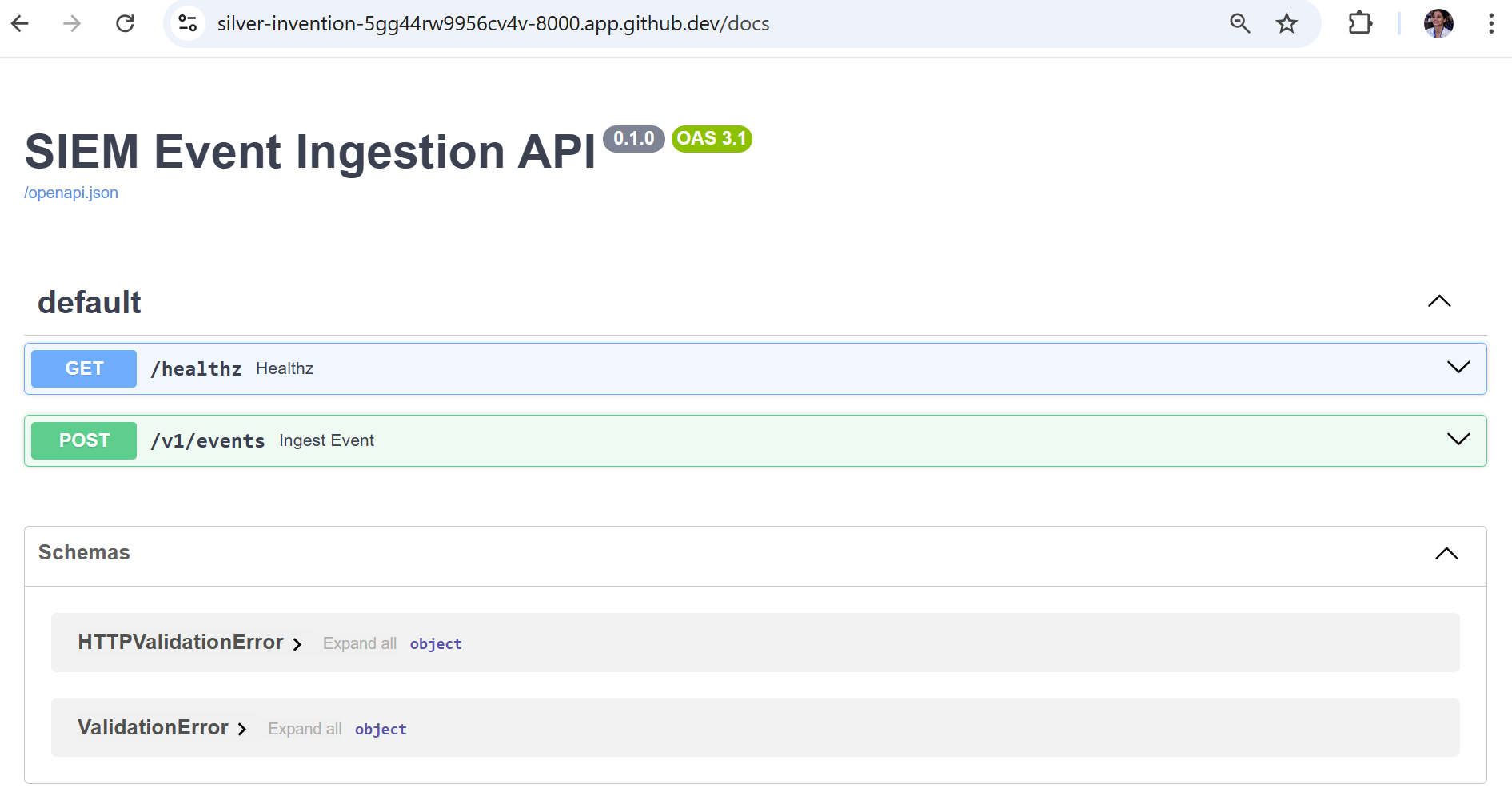
Interactive OpenAPI documentation generated automatically by FastAPI in a GitHub Codespaces environment.
-
Swagger UI loaded successfully
-
API endpoints listed and interactive
-
API title
-
GET /healthz -
POST /v1/events -
Schema definitions
When Uvicorn binds to 0.0.0.0:8000, Codespaces detects the open port and automatically:
-
Forwards it
-
Assigns a public HTTPS URL
-
Secures it behind GitHub authentication
Codespaces automatically forwards ports to allow browser access to services running inside the container. This replaces localhost with a secure external URL.
Health Check
When running inside GitHub Codespaces, the API is exposed via a forwarded HTTPS URL.
To verify that the API is reachable, use the forwarded domain:
curl https://`<codespace-name>`-8000.app.github.dev/healthz
Example:
curl https://silver-invention-5gg44rw9956cv4v-8000.app.github.dev/healthz
The /healthz endpoint returns a simple JSON response. Health endpoints allow monitoring systems or load balancers to verify service availability. If the API is running correctly, the response will be:

Ingest an Event via CLI
Send a structured security event to the ingestion endpoint:
curl -X POST http://localhost:8000/v1/events \
  -H "Content-Type: application/json" \
  -H "X-API-Key: change-me" \
  -d '{
    "timestamp":"2026-02-17T10:10:10Z",
    "source":"auth-service",
    "environment":"prod",
    "severity":"high",
    "category":"auth",
    "action":"login_failed",
    "actor":{"type":"user","id":"u-123"},
    "metadata":{}
  }'
The API:
-
Validates the request body using Pydantic.
-
Checks the API key.
-
Applies rate limiting.
-
Inserts the event into the database.
The POST /v1/events route processes incoming events and ensures:
-
Schema correctness
-
Authentication enforcement
-
Controlled request rate
-
Durable storage

Successful event ingestion using curl.
Using Swagger “Try it out”
Swagger allows interactive testing without using curl. The same POST request is executed via the browser. Swagger UI uses the OpenAPI spec to generate a form-based interface that sends HTTP requests.
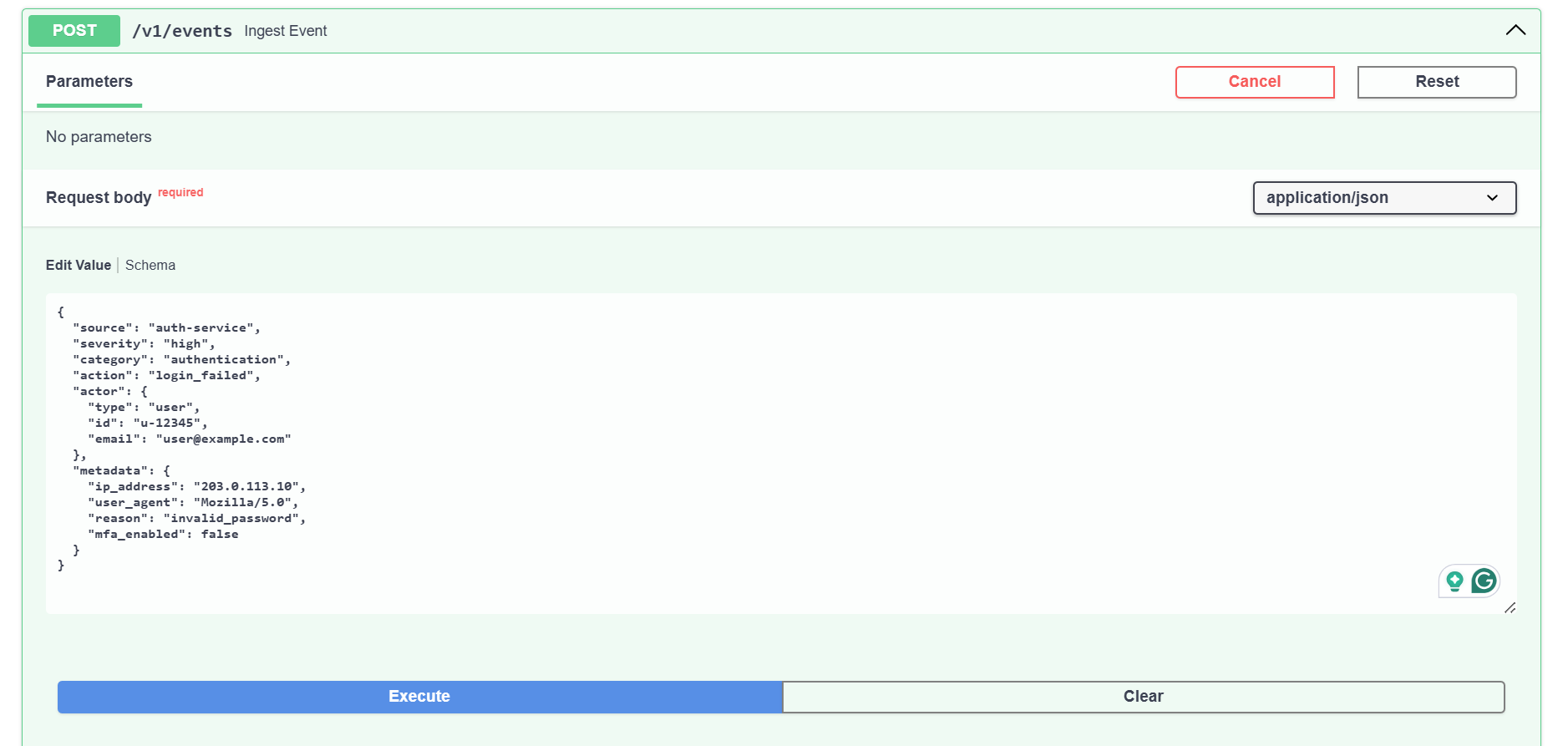
Submitting a structured event payload directly from Swagger UI.
Successful Response
After executing via Swagger, the server processes the event and returns a structured success response.
Successful 200 OK response including event_id.
Data Persistence
After successful ingestion:
ls -l
SQLite creates events.db in the project directory. The database is initialized on application startup and writes events to disk. Confirmation that events are stored durably:

SQLite database file created locally after event ingestion.
Error model
| Status code | Meaning |
|---|---|
| 401 | Unauthorized |
| 422 | Validation Error |
| 429 | Rate Limit Exceeded |
OpenAPI snippet
paths:
  /v1/events:
    post:
      summary: Ingest a security event
      responses:
        '200':
          description: Event ingested successfully
        '401':
          description: Unauthorized
Operational considerations
| Step | Description |
|---|---|
| Use idempotency keys for safe retries | Prevents duplicate event ingestion if the client retries the same request due to network failures or timeouts. Ensures safe reprocessing without creating multiple records. |
| Log request IDs for traceability | Enables end-to-end request tracking across systems, making debugging, auditing, and incident investigation easier. |
| Replace in-memory rate limiting with Redis in production | Moves rate limiting to a distributed store so limits are enforced consistently across multiple API instances in horizontally scaled environments. |
Future scope
While this guide focuses on local development and architectural clarity, these below improvement points outline the path toward building a production-ready security event ingestion system.
Security enhancements
-
Replace API keys with OAuth2 or mTLS
Implement token-based authentication or mutual TLS for stronger service-to-service trust. -
Role-Based Access Control (RBAC)
Restrict event ingestion and retrieval based on service identity or tenant permissions. -
Request Signature Validation
Add HMAC or signed payload verification to prevent tampering and replay attacks. -
TLS Enforcement and Certificate Management
Ensure encrypted communication using managed certificates in production.
Scalability improvements
-
Replace SQLite with a Production Database
Use PostgreSQL, a managed database service, or distributed storage for higher durability and performance. -
Introduce Message Queues
Add Kafka, Pub/Sub, or similar systems to buffer and stream high-volume events. -
Distributed Rate Limiting
Replace in-memory rate limiting with Redis or an API gateway-based limiter. -
Horizontal Scaling
Deploy behind a load balancer or container orchestration platform such as Kubernetes.
Observability and monitoring
-
Structured Logging
Add structured logs for ingestion activity and failures. -
Metrics and Monitoring
Expose Prometheus metrics for ingestion rates, error rates, and latency. -
Audit Logging
Maintain immutable audit trails for compliance and forensic investigations.
Functional extensions
-
Event Retrieval APIs
Implement filtered search endpoints for querying events by severity, category, or time range. -
Schema Versioning
Support backward-compatible schema evolution for event payloads. -
Multi-Tenant Isolation
Separate event storage and access control across tenants or customers.
Deployment enhancements
-
Containerization
Package the application using Docker for portable deployment. -
Cloud Deployment
Deploy to managed platforms such as Google Cloud Run, AWS ECS, or DigitalOcean App Platform. -
Infrastructure as Code (IaC)
Use Terraform or similar tools to provision production infrastructure.